Tech stack consolidation is the process of reducing the software tools your organization runs and standardizing work on a smaller, more integrated set of systems.
The business case goes beyond cutting costs. When your data lives in one place, customer-facing teams report from the same numbers, automate across the full customer journey, and stop rebuilding context every time a customer moves from marketing to sales to service.
The foundation is a CRM system of record: a single platform that holds customer data, powers workflows, and serves as the source of truth for every team that touches the customer.
Table of Contents
What is tech stack consolidation, and why does it matter?
Tech stack consolidation means retiring redundant tools, standardizing on a core platform, and building cleaner integrations between the tools that remain.
It’s different from canceling a few subscriptions. Real consolidation means deciding which tools define your system of record, which extend it, and which exist because no one turned them off. It fixes tool sprawl at the root rather than managing symptoms one contract at a time.
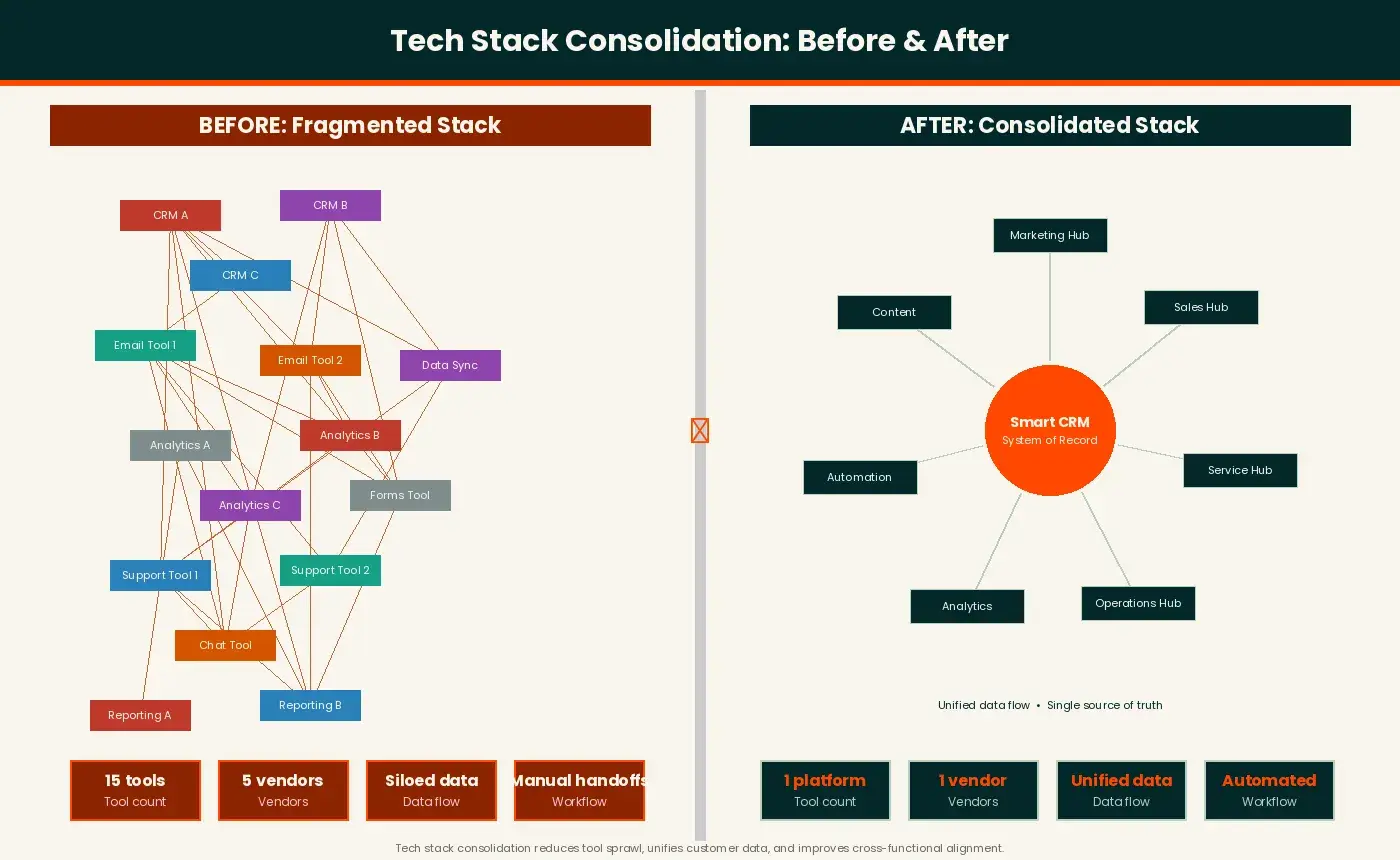
The core benefit is unified customer data. When your CRM captures every interaction from first web visit through renewal, teams aren’t reconciling three definitions of “active customer” before every board meeting. Reporting gets faster. Automation works across the full lifecycle. And customer experience improves because reps have the context they need.
For a broader look at what a modern stack looks like, see Tech Stack: Definition + 9 Examples from the World’s Top Brands.
Cost savings matter, but they’re secondary. According to Gartner, software spending continues to climb even as organizations add more tools. The biggest returns come from reinvesting operational gains — better data, faster workflows, fewer integration failures — into execution.
When to Start Tech Stack Consolidation
Check whether any of these apply:
- Overlap across categories. You’re paying for two or more tools to do the same job, and teams have split across them.
- Low adoption. License utilization is low, but contracts are auto-renewed because no one reviewed them.
- Renewals with no clear owner. Tools are renewed by default because procurement, finance, and the original buyer are disconnected.
- Data silos. Marketing, sales, and service maintain separate customer records and reconcile manually — or not at all. See Data Silos: What They Are and How to Get Rid of Them.
- Security exposure. Shadow IT creates risk IT can’t see, and compliance can’t audit.
- Inconsistent reporting. The same metric produces different numbers depending on which team pulls it.
- Manual handoffs. Processes that should be automated require humans to copy data between tools. See Integration Automation: Meaning, Benefits, & Tools You’ll Love.
- Onboarding friction. New hires spend weeks learning a patchwork of disconnected systems.
If three or more are true, consolidation is an operational fix, not just a nice-to-have. The right trigger isn’t a specific tool count — it’s when your stack generates more friction than the tools remove.
Tech Stack Consolidation Benefits Across Your Business
Marketing: A consolidated martech stack means less time fighting data discrepancies and more time on campaigns. Attribution improves when all touchpoints feed one platform. Automation (nurtures, lead scoring, lifecycle changes) works across the full funnel. For more, see How to build a marketing tech stack that’ll grow with you.
Sales: Reps working from a single CRM don’t toggle between tools to understand a prospect’s history. Pipelines, activity logs, sequences, and notes live in one place. Forecasting improves because the underlying data is complete.
Service: Support teams see the full customer record (purchase history, past conversations, open deals) without leaving their helpdesk. Escalations move faster and agents stop asking customers to repeat themselves.
Operations, Finance, and IT: Vendor consolidation simplifies procurement, shrinks the attack surface, and lets finance reconcile spend against actual utilization. Ops spends less time maintaining custom integrations and more time on higher-value work.
How to Do Tech Stack Consolidation: Step by Step
Teams frequently skip the audit phase, moving directly into tool selection. These steps follow the sequence that works.
Step 1: Audit your current stack.
Pull a complete inventory of every tool your organization pays for or uses, including shadow IT and departmental purchases outside central procurement. For each tool, document:
- Tool name and category
- Business owner and primary users
- Cost and contract renewal date
- Active users versus licensed seats
- What data flows in and out
- What breaks if you turn it off
Key artifact: A master tool inventory with ownership, cost, renewal date, utilization, and data flow for every tool.
Step 2: Prioritize categories and wins.
Group tools by category and identify:
- High-overlap categories: multiple tools doing the same job
- Low-utilization tools: licensed but barely used, low retirement risk
- High-integration complexity: deeply embedded tools that require significant migration work
- Quick wins: tools are retirable in 30–60 days with minimal disruption
Quick wins build confidence and free up budget for harder migrations.
Step 3: Define the system of record and data standards.
Decide where customer data lives before selecting or retiring any tool. A CRM as the system of record means:
- Every customer interaction is logged in one place
- All other tools write to or read from it
- Reporting starts from a single authoritative dataset
Once defined, set data standards: field naming conventions, lifecycle stage definitions, and deduplication rules. These keep integrations predictable and prevent data quality from degrading during migration. See Data Integration: What It Is and How to Achieve It.
Pro tip: HubSpot’s Smart CRM is built for this role, unifying contact, company, deal, and ticket data across marketing, sales, and service. See how Smart CRM works as your system of record.
Step 4: Select what to keep and why.
Evaluate each tool against a consistent set of criteria:
- Does it solve a problem the system of record can’t handle natively?
- Does it have real adoption?
- Does it integrate cleanly, or does it require expensive custom work?
- Does the vendor’s roadmap align with where you’re going?
Retire what doesn’t earn its place. Evaluate on outcomes.
Step 5: Plan migrations without disruption.
Before retiring any tool:
- Export and validate all data
- Map fields to your system of record
- Flag records needing deduplication or cleanup
- Run a pilot migration before the full rollout
- Communicate the go-live date at least 30 days out
Phase rollouts by department or use case to catch issues early.
Step 6: Enable teams and measure adoption.
Consolidation fails when teams revert to old tools because they weren’t trained. For each migrated function:
- Run role-specific training (not generic platform walkthroughs)
- Document the workflows each team runs daily
- Set adoption targets and track them weekly for the first 90 days
- Assign an internal champion or vendor contact for issues
Track adoption alongside business outcomes. Data completeness, automation trigger rates, and workflow completion rates tell you more than login counts alone.
Step 7: Govern and prevent re-sprawl.
Without governance, sprawl returns within 12–18 months. Set up:
- Intake process: all new software requests go through review before purchase
- Category owners: a named owner per tool category responsible for renewals and new requests
- Quarterly review: utilization review tied to major contract windows
- Documented standards: data standards and approved vendors written down and accessible
Common Tech Stack Consolidation Challenges and Fixes
Stakeholder resistance: Teams resist losing tools they’ve built workflows around.
Legacy edge cases: Some tools cover a specific workflow that nothing else replicates.
Integration gaps: Two systems you assumed would connect turn out to need custom work.
Contract timing: You’ve decided to retire a tool but you’re mid-contract.
-
Fix: don’t rush the migration. Document the decision, plan it, and execute at renewal. Use the interim period to wind down utilization.
Dirty data: Migrating bad data into a clean system just moves the problem.
-
Fix: budget for a data-cleaning phase before any migration. Deduplicate, standardize, and archive stale records first.
Missing alignment with procurement, security, and finance: Decisions made without these stakeholders create downstream problems.
How to Prevent SaaS Sprawl After Consolidation
Intake Process
Route all new software requests (including free trials) through a brief intake form covering business case, cost, integration requirements, and whether something similar already exists. Without this gate, sprawl restarts immediately.
Category Ownership
Assign a named owner to each tool category. They own renewals, utilization reviews, and new requests in their category. This eliminates the “nobody’s job” gap that leads to tools piling up.
Renewal-based Review Cadence
Run quarterly reviews anchored to major contract windows. Check utilization against licensed seats and flag anything approaching renewal with low adoption.
Documented Standards
Data standards, integration requirements, and your approved vendor list need to live somewhere people actually find them — not a forgotten shared folder. Build them into onboarding for new ops, IT, and marketing hires.
Living Tool Inventory
Keep the inventory from Step 1 updated at every renewal and new purchase. It’s your governance record and your baseline for the next consolidation cycle.
Tech Stack Consolidation Mistakes to Avoid
- Buying without checking what you already have. Do this instead: Before evaluating any new tool, check whether the capability exists somewhere in the stack.
- Evaluating on features instead of outcomes. Do this instead: Define the outcome you need and evaluate tools on whether they produce it.
- Skipping data standards. Do this instead: Set field naming, lifecycle stages, and deduplication rules before migration begins. Retrofitting them later is much harder.
- Treating renewals as autopilot. Do this instead: Flag every renewal 90 days out and review utilization before it rolls over.
- Underfunding enablement. Do this instead: Budget training as part of the project. A well-chosen tool with no enablement produces the same result as the one you just retired.
- Making it a stealth IT project. Do this instead: Keep marketing, sales, and service leaders involved throughout. Decisions made in a vacuum create workarounds the moment the project closes.
- Rushing the system-of-record decision. Do this instead: Evaluate CRM options against current usage and future roadmap needs. It’s the hardest decision to reverse.
Your 90-day Tech Stack Consolidation Plan
Adjust scope based on your tool count and team size.
Days 1–30: Audit and align.
|
Week |
Action |
Owner |
Artifact |
|
Week 1 |
Pull tool inventory from finance, IT, and department heads |
RevOps / IT |
Master tool list |
|
Week 1–2 |
Add utilization, renewal dates, data flows, and owners |
RevOps |
Annotated inventory |
|
Week 2–3 |
Map data flows and integration dependencies |
IT / Ops |
Data flow diagram |
|
Week 3 |
Present findings to leadership; align on goals |
RevOps lead |
Findings deck |
|
Week 4 |
Define system-of-record candidate and data standards |
RevOps + Marketing + Sales |
Standards doc |
Days 31–60: Prioritize and plan.
|
Week |
Action |
Owner |
Artifact |
|
Week 5 |
Score tools against keep/retire criteria; identify quick wins |
RevOps |
Scored tool list |
|
Week 6 |
Confirm system-of-record selection; validate integrations |
RevOps + IT |
Integration map |
|
Week 7 |
Build migration plan for quick wins |
IT / Ops |
Migration runbook |
|
Week 8 |
Communicate plan to affected teams; set go-live dates |
RevOps lead |
Change comms |
Days 61–90: Execute pilot and govern.
|
Week |
Action |
Owner |
Artifact |
|
Week 9 |
Run pilot migration for first quick-win tool |
IT / Ops |
Pilot report |
|
Week 10 |
Train affected teams on replacement workflow |
Enablement lead |
Training materials |
|
Week 11 |
Go live with first retirement; track adoption |
RevOps |
Adoption dashboard |
|
Week 12 |
Stand up governance: intake form, category owners, review cadence |
RevOps |
Governance doc |
After Day 90, consolidation shifts into quarterly review cycles that keep sprawl from returning.
Ready to start? HubSpot’s Smart CRM gives your team a single platform for marketing, sales, and service data built to serve as the system of record from day one. Get started with Smart CRM.
Frequently Asked Questions About Tech Stack Consolidation
How long does tech stack consolidation take?
Most efforts take three to twelve months, depending on stack size, integration complexity, and how many tools need data migration. The 90-day plan covers the audit-through-pilot phase. Full CRM migrations often take a full quarter. Organizations with larger stacks or multiple business units typically run consolidation in waves over 12–18 months.
How do I avoid vendor lock-in while consolidating?
Prioritize platforms with open APIs and a documented partner ecosystem. Avoid proprietary data formats. Negotiate data portability terms into enterprise contracts. And maintain a lightweight integration layer between your system of record and category tools so each one stays replaceable.
Can smaller teams benefit from consolidation?
Yes, often more directly. A five-person team running eight tools carries proportionally higher overhead than an enterprise team. For small teams, the main benefit is time savings and cleaner data. Starting with a platform that covers multiple functions natively removes the integration burden entirely.
What should I measure to confirm consolidation is working?
Track four areas: (1) Cost — total software spend and cost per seat; (2) Data quality — record completeness, duplicate counts, field standardization; (3) Adoption — active users and feature utilization; (4) Business outcomes — conversion rates, deal velocity, customer satisfaction. Set baselines before migration and check at 30, 60, and 90 days post-rollout.
How do I handle edge-case tools during consolidation?
Keep them if they cover a real workflow, have genuine utilization, and integrate cleanly with your system of record. Document them as deliberate exceptions. If the “edge case” is actually low utilization with a narrow use case, invest in a workaround within your core platform instead of carrying another vendor relationship.
Looking to build a marketing tech stack that scales? See How to build a marketing tech stack that’ll grow with you.

