AI SEO tools for small businesses are essential to keep up with marketing trends and stay competitive. Yet most small businesses are trying to figure out which AI tools are actually worth their time and which ones are necessary, especially when there is an abundance of tools promising to solve every problem imaginable. The good news is that AI is available in just about every tool.

The truth is that small businesses have to invest in AI SEO tools, either in time or with cash. The stats show it clearly: AI in marketing is growing. According to HubSpot’s latest AI Trends for Marketers report, two-thirds of marketers globally use AI in their role. Among American marketers, that number climbs to 74%.
This guide cuts through the noise. It covers the essential AI SEO tools for small businesses that lean teams are actually using to do more with less. It includes free essentials like Google Search Console (GSC) and Google Analytics (GA4), and dedicated, paid-for platforms like HubSpot.
Table of Contents
Which AI SEO tools for small businesses deliver ongoing value?
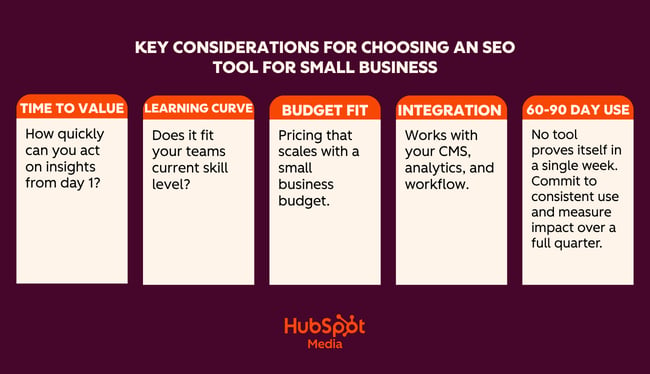
AI SEO tools help small businesses research keywords, create content, optimize pages, fix technical issues, and track visibility. Choosing the right SEO tools based on what they can do for business is what’s challenging. Generally, small business buyers should prioritize time-to-value, learning curve, cost, and integration ease.
Time-to-Value
Time-to-value measures how quickly a tool delivers useful output after setup.
Time-to-value matters enormously for a lean team without a dedicated SEO resource. A tool that requires two weeks of configuration, or an external consultant to come in and set it up, may be more trouble than it’s worth. Unless, of course, the business is certain the investment is worth it.
Think about how quickly the business needs the tool to be live and running, and what the impact is on workflows and other business priorities. Sometimes, the time (and potentially cash) investment is worth it. Other times, a tool that runs with minimal setup and can surface recommendations within 24 hours is more appealing.
Here’s a real-life scenario showing how to think about time-to-value:
If I’m working with a new client, certain tools are a no-brainer. For example, Google Search Console (GSC) is a free tool, and the data it provides is invaluable. I tell all my clients to set this up, or I do it for them. Once someone has added the tracking script to the website, the tool runs on its own in the background. Within 24 hours, I get valuable data about the website and SEO performance. It’s clear to me that GSC is a must-have for all websites.
Compared to GSC, HubSpot requires more time to set up. If unlocking certain features is required, a cash investment is required, too, because some of HubSpot’s features are only available in higher editions.
The difference here is that GSC does a few things really well, such as:
- Shows exactly which search queries are driving impressions and clicks.
- Identifies indexing issues and crawl errors that Google has flagged.
- Tracks average position and click-through rate by page and keyword.
- Flags Core Web Vitals issues affecting page experience.
- Submits sitemaps and requests re-indexing after page updates.
HubSpot does a lot of things really well and adds a layer of sophistication to marketing and other business operations. For example, HubSpot:
- Features AI-powered SEO recommendations that prioritize what to fix and why.
- Has content optimization tools that help teams draft, refine, and publish on-brand content.
- Tracks organic performance alongside email, ads, and CRM data in one place.
- Connects SEO activity directly to leads and revenue in the same platform.
- Automates reporting so teams aren’t manually pulling data from multiple tools.
- Has a free CRM built in — contact, deal, and pipeline management without an extra subscription.
- Connects SEO and content efforts directly to leads, deals, and revenue in the same platform.
- Tracks the full customer journey from first organic visit to closed deal.
- Features email marketing, landing pages, and forms that all live in the same ecosystem as SEO tools.
- Includes social media management and ad tracking alongside organic performance data.
- Automates lead nurturing workflows triggered by content engagement.
- Features shared dashboards that mean sales and marketing teams work from the same data.
- Scales with the business with free tools to start, and Pro and Enterprise editions as needs grow.
- Reduces tool sprawl by replacing multiple point solutions with one platform.
Some tools may take more time to set up and require a payment. But these tools and their features may be business critical.
If a tool can help save human hours and labor, influence marketing conversions, solve problems across the business, and directly contribute to business growth, then the time — and cash — investment is worth it. If a tool takes two weeks to set up and the marketing team never opens it, the value isn’t there.
Learning Curve
A tool is only as useful as the team’s ability to use it consistently. Complex platforms built for enterprise SEO agencies often overwhelm small-business users with feature depth they don’t need. When evaluating a learning curve, it’s worth asking:
- Can a non-technical marketer or founder navigate this tool independently?
- Does it explain why something is a problem, not just flag that it is?
The AI tools for SEO that perform best for small teams offer guided workflows, plain-language recommendations, and clear next steps rather than raw data that requires expert interpretation.
Cost and Budget Fit
The strongest AI SEO solutions for small businesses are those that live at the intersection of:
- Required functionality
- Affordable price point
- Potential for scale at affordable prices
Businesses need tools that teams will use and that solve a unique problem at an affordable price point. From there, any tool needs to scale with the business. Consider the cost implications one year, or even five years, into the future. If upgraded packages are going to be out of budget, it might not be a good idea to invest now because the headache and time-sap of switching tools later could be extreme.
Pro tip: Before committing to any paid tool, map out the three SEO tasks that take the most time each week and that no other tools help with. Then evaluate each platform specifically against those tasks. A tool that solves one real bottleneck will always outperform a tool that addresses multiple.
Integration Ease
If a tool can integrate with existing systems, adoption rates increase. According to MuleSoft, 86% of IT leaders say that AI agents can bring complexity instead of value without proper integration.
For example, if SEO data connects to an already-in-use Content Management System (CMS), it feels easier to adopt the new tool because it plugs into an existing workflow, rather than creating a new workflow that operates in a silo. Integrations with existing tools also improve and enhance workflows and data rather than complicate them. They’re simply more motivating for teams to get involved with.
When comparing platforms, check how well they connect with the tools a team already uses.
60 to 90 Day Usage as the Real Test
Demo performance and trial-period enthusiasm rarely tell the full story. The more reliable measure of a tool’s value is whether teams are still using it consistently at the 60- to 90-day mark and whether they can point to specific outcomes that the tool contributed to.
When doing an AI SEO tools comparison, speak to any tool’s sales reps and see what your team can negotiate as a testing period. Or consider paying monthly for a few months before committing to an annual billing.
What AI Can and Can’t Do for Small-Business SEO
Small business SEO can’t rely on tools alone. Here’s an honest breakdown of where AI pulls its weight, and where brands still need human oversight.
Drafting and Scaling Content Quickly (Tread With Caution)
AI can generate blog posts, FAQs, service page copy, and meta descriptions in minutes. For a small business that struggles to publish consistently, this is a genuine time-saver. Prompt AI with your target keyword, your audience, and your tone, and get a solid working draft without staring at a blank page.
The quality of an AI draft depends on the topic. For example, an objective truth, or a simple question like “What is anchor text?” or “What does bounce rate mean?” is easily written with AI.
However, thought leadership pieces, or content that requires a new or expert opinion, are better written or heavily edited by a human. For example, “Is SEO dead in the age of AI search?” or “How should small businesses respond to Google’s latest algorithm update?”
Where human review still matters: AI doesn’t know your business, audiences, or industry the way subject-matter experts do. It may get facts wrong, miss nuances, or sound generic. Editors should review every piece of AI-drafted content so that it’s personalized and fact-checked before it goes live. Google also rewards content with genuine expertise and first-hand experience — and these are things AI can’t credibly create.
Finding Keyword and Topic Ideas
AI tools are good for generating ideas. Ask one to suggest keyword clusters around your service, generate questions your customers might search for, or identify related topics that may be otherwise missed. This can replace hours of manual research for a small team with no dedicated SEO resources.
Where human review still matters: AI often suggests keywords with no real search volume data behind them. Marketers should still run the best ideas through a tool like Google Keyword Planner to validate demand before building content around them. Or, at least a human sense check. While AI can generate a bunch of keyword ideas, I don’t rate it for content clustering or search engine results page (SERP) analysis.
Optimizing Existing Pages
Paste a webpage into an AI tool and ask it to rewrite the title tag, improve the meta description, tighten the heading structure, or make the copy more readable. For small businesses with dozens of underperforming pages, this kind of audit-and-improve workflow can get meaningful results without a big budget.
Where human review still matters: On important pages, include a layer of human review or judgment. On the whole, AI can do this pretty well, and if SEO specialists are reducing missed title tags on pages that don’t depend on SEO for visits, then an AI title tag is probably fine.
AI SEO Tools for Small Business
The tools in this guide are here because they solve real problems for lean teams and because the AI built into each one is genuinely useful.
If building an SEO foundation from scratch, the HubSpot SEO Starter Pack is a free resource worth downloading before diving into any of these tools.
First, a comparison table for a quick AI SEO tools for small business comparison:
Tools for SEO and Technical Audits
HubSpot SEO Recommendations
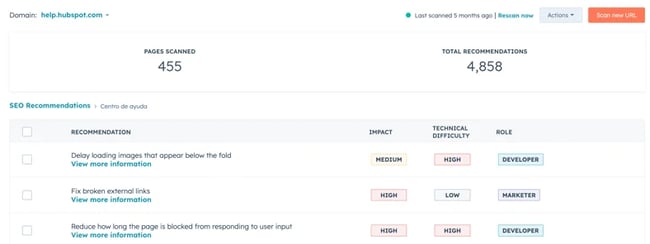
HubSpot’s SEO recommendation tools live inside Marketing Hub and represent one of the most integrated approaches to SEO available to small businesses. Unlike standalone SEO platforms that hand over a list of issues and leave teams to figure out the rest, HubSpot connects SEO recommendations directly to the content editor, the CRM, and the reporting dashboard. This unification means that every fix, piece of content, and ranking improvement is tied to real business outcomes.
The real value is the presentation of findings. Standalone tools like Screaming Frog are excellent, but businesses need an SEO expert who can decipher issues and assign their solutions when using that kind of tool.
SEO recommendations in Marketing Hub prioritize on-page updates for non-experts, which is exactly what makes it well-suited for small business teams without a dedicated technical SEO resource. Rather than presenting raw data that requires interpretation, HubSpot explains why something is flagged, what impact it has on search performance, and what action to take to resolve it. Anyone can figure out what an issue is, how to solve it, and how much of an impact it’s causing, which helps with prioritization.
HubSpot’s guide to understanding SEO recommendations is a useful reference for a full breakdown of what each recommendation type means.
What HubSpot SEO Recommendations Does
The SEO Recommendations tool automatically scans a website’s live pages and surfaces issues ranked by priority:
Recommendations are accessible site-wide under Marketing > SEO, or page-by-page through the Optimize panel inside HubSpot’s content editor. This means writers and marketers can catch and fix SEO issues without ever leaving the tool they’re already working in.
On the technical side, HubSpot’s SEO tools scan for the issues that most commonly suppress rankings for small business websites: broken links, missing or duplicate meta descriptions, missing alt text on images, HTTPS issues, slow-loading pages, and heading structure problems. Each flagged issue comes with a clear explanation and a specific action — not just “fix your meta descriptions,” but exactly which pages need attention and what good optimization looks like.
On the on-page side, the Optimize sidebar inside the content editor checks keyword placement and relevance, flags keyword stuffing, reviews readability, and surfaces internal linking opportunities, all while a page is being written or edited. Teams can analyze SEO performance across the entire site from a single dashboard, tracking organic sessions, keyword rankings, and how individual pages are trending over time.
Where HubSpot SEO Sits Within a Broader Marketing Stack
HubSpot’s value proposition becomes genuinely difficult to match. The SEO tools are part of the same platform as email marketing, landing pages, social media, ads, and the free CRM. That means teams can track the full journey from first organic search visit to closed deal, without exporting data between tools or reconciling reports across different platforms.
The CRM integration makes HubSpot one of the best tools for SEO for B2B. This connection ties SEO activity directly to pipeline and revenue data in the CRM. It becomes possible to show exactly what organic traffic is worth, not just in clicks, but in leads and deals.
Teams on Marketing Hub Pro or Enterprise have access to both SEO and AEO (Answer Engine Optimization) tools. Marketers get visibility into traditional organic rankings and how their brand is appearing in AI-generated answers. More on that below.
Pricing
HubSpot’s SEO tools are available across multiple editions. Basic SEO recommendations are available on free and Starter plans. The full suite, including topic clusters, advanced reporting, content strategy tools, and AEO features, requires a Pro or Enterprise subscription.
For small businesses evaluating cost against capability, it’s worth comparing the total cost of HubSpot against the combined cost of the separate tools it replaces: CMS, CRM, email platform, SEO tool, and reporting dashboard.
Best for: Small business marketers and lean teams who want one tool to do it all: SEO, content, CRM, and reporting in one place.
SE Ranking
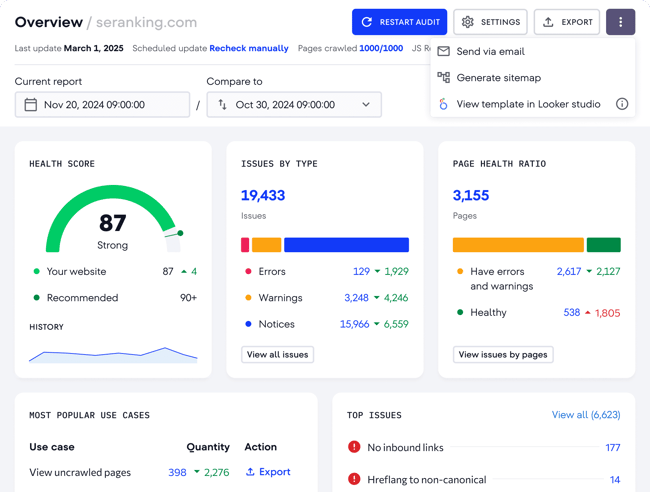
SE Ranking is a comprehensive AI-powered platform that provides keyword tracking, site audits, competitive research, and AI-specific insights. Beyond technical SEO, SE Ranking also covers keyword research, backlink analysis, competitor monitoring, and content gap identification. It’s a well-rounded platform and includes top AI search optimization tools for content creators working across multiple clients or projects.
Key Features
- AI-powered site audit crawls the full website and flags technical issues, including broken links, redirect chains, missing metadata, duplicate content, and page speed problems, with prioritized recommendations for each.
- Keyword rank tracker monitors keyword positions across Google and Bing with daily updates, historical data, and built-in competitor comparison.
- On-page SEO checker analyzes individual pages against top-ranking competitors and surfaces specific recommendations to improve organic position, such as improving relevance, structure, and content depth.
Pricing: Plans start at the Wallet tier, with Standalone and Enterprise tiers available for larger sites or agencies. A 14-day free trial is available with no credit card required.
What I like: SE Ranking hits a sweet spot for small businesses: it has the depth of a premium SEO platform but is priced accessibly enough for small businesses to justify. The interface is clean, and the recommendations are actionable. It doesn’t just flag problems; it explains what to do about them, which matters when there’s no in-house SEO specialist to interpret the data.
For teams considering alternatives: Semrush and Ahrefs are both excellent platforms, arguably the most powerful in the category, and either would be a strong choice for teams with the budget to match. You can’t go wrong, and the right choice comes down to preference.
Best for: Small businesses and lean SEO teams that need a full-featured SEO platform without the price tag of enterprise tools like Semrush or Ahrefs.
Tools for Automated Content Optimization
Creating content consistently is one of the biggest SEO bottlenecks for small business teams. The tools in this category use AI to speed up the drafting, optimizing, and structuring process.
Content Hub
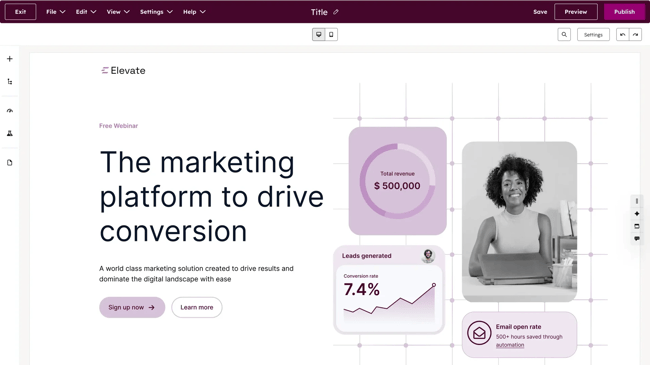
HubSpot’s Content Hub is where content strategy, creation, optimization, and performance measurement all come together. For lean teams trying to do more with fewer people, that consolidation is essential.
One of Content Hub’s most valuable features for small businesses is the topic cluster tool. The premise is straightforward: rather than publishing isolated blog posts on loosely related topics, teams build content around a core pillar page (a comprehensive, authoritative piece on a broad subject), supported by a network of cluster content that covers related subtopics in depth. Each cluster piece links back to the pillar, and the pillar links out to the clusters, creating an interconnected content structure that signals topical authority to search engines.
Read more about pillar and cluster strategy:
This approach is one of the most reliable ways for small business websites to compound organic traffic. Search engines reward sites that show depth and expertise on a subject, and a well-structured topic cluster does exactly that.
For teams new to content planning, the topic cluster tool can transform a scattered blog archive into a structured, rankable content asset. Content Hub makes it straightforward to map, build, and monitor those clusters without a separate content strategy platform.
Breeze: HubSpot’s AI Layer For Content
Inside Content Hub, Breeze functions as the engine behind the platform’s content creation and optimization capabilities. Rather than a single feature, Breeze is a suite of AI tools embedded throughout the content workflow, from the moment a topic is identified to the moment a post is published and promoted.
Breeze bridges the gap between AI writer and human. Content writers use Breeze as a co-pilot, meaning content is co-created with AI. Throughout the process, human writers can input their experience and edits.
Content Hub AI blog writer helps teams draft and refine on-brand content starting from a topic or keyword. It then generates a structured draft, allowing writers to refine, expand, or rewrite sections without leaving the editor. Breeze Content Agent suggests blog topics and generates search-optimized drafts that incorporate an established brand voice, functioning as a multiplier for subject-matter experts rather than a replacement for them.
As a writer and SEO specialist, I feel that content co-created by AI is the most efficient way to work. Compared to churning out an entire blog post with AI, co-creation with Breeze upholds a higher standard of content. The layer of ongoing human review protects accuracy, brand voice, and trust.
Beyond first drafts, Breeze handles the optimization work that typically falls through the cracks on lean teams: generating meta titles and descriptions, suggesting internal links, reformatting content for readability, and remixing existing content into new formats. Content Remix repurposes one asset across formats and channels, turning a blog post into a social caption, an email intro, or a landing page section without starting from scratch each time.
HubSpot’s Brand Voice capability allows Breeze to generate content within defined tone and language parameters. This means AI-generated drafts don’t come out sounding generic. For small businesses where brand voice is a genuine differentiator, this feature ensures that speed doesn’t come at the cost of consistency.
Performance Tracking Tied to Revenue
Because Content Hub sits on top of HubSpot’s CRM, every piece of content is tracked, not just for traffic and rankings but for its contribution to leads, pipeline, and revenue. Teams can see which blog posts generate contacts, which pillar pages drive the most organic sessions, and how content performance trends over time, all without exporting data to a separate analytics platform.
For AI SEO solutions for small businesses that need to justify content investment to stakeholders or clients, this attribution capability is significant. It moves the conversation from “our blog traffic is up” to “our content contributed X leads and Y deals this quarter.”
Pricing: Content Hub is available as a standalone product with a free plan. Paid plans start at $20 per user per month. Content Hub can also come as part of a broader HubSpot subscription.
Breeze Content Agent, including AI blog drafting and Content Remix, is available on Content Hub Pro and Enterprise editions. For small businesses already using Marketing Hub, it’s worth checking whether features are already included in the current plan before purchasing separately.
Yoast
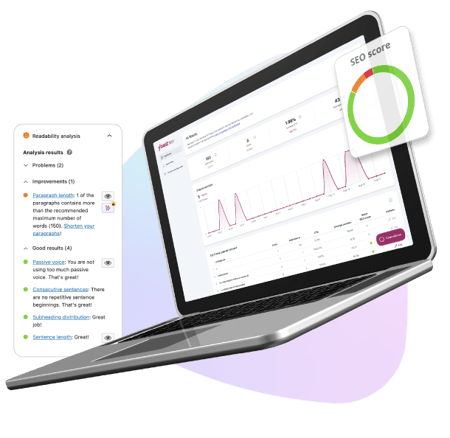
Best for: Small businesses running WordPress websites that want real-time on-page SEO guidance built directly into their content workflow.
Yoast has long been the default SEO plugin for over millions of websites. For WordPress users, it’s one of the lowest-friction ways to bring AI-assisted SEO recommendations into the writing process — no separate platform to log into, no manual audits to run. The recommendations surface inside the WordPress editor as content is being written or edited.
Key Features
- Real-time on-page SEO analysis: Checks keyword placement, heading structure, meta titles, meta descriptions, and internal linking as content is written, with a clear traffic-light scoring system that flags what needs attention before publishing.
- AI-generated titles and meta descriptions: Yoast’s algorithm analyzes the content of each page and generates multiple options for SEO titles and meta descriptions, allowing teams to choose the best ones, request more options if needed, and customize the output to align with brand voice.
- Readability analysis: Evaluates sentence length, paragraph structure, use of transition words, and passive voice, helping non-expert writers produce content that’s easier for both readers and search engines to process.
Pricing: The free package covers basic on-page SEO analysis, focus keyphrase, readability checks, and XML sitemaps. A solid starting point for small businesses with tight budgets. There are Premium and AI+ packages available that start at $9.90 per month.
What I like: I’ve used Yoast for my entire career. I think it’s excellent. Candidly, I’ve found the free version to be enough, but I have the expertise to manage SEO elements without Premium. For small businesses that need more support, consider paying for Premium. It’s very affordable.
The one thing to keep in mind is that Yoast is an optimization assistant, not an SEO platform. It helps teams polish and improve existing content. It’s not the right tool for keyword research, competitor analysis, backlink monitoring, or rank tracking. For small businesses that need those capabilities, Yoast works best alongside a tool like SE Ranking.
If teams are using HubSpot, then Yoast isn’t needed at all because Content Hub will do what Yoast does. It’s worth going back to those considerations before buying tools, especially time-to-value and cost and budget fit.
AnswerThePublic
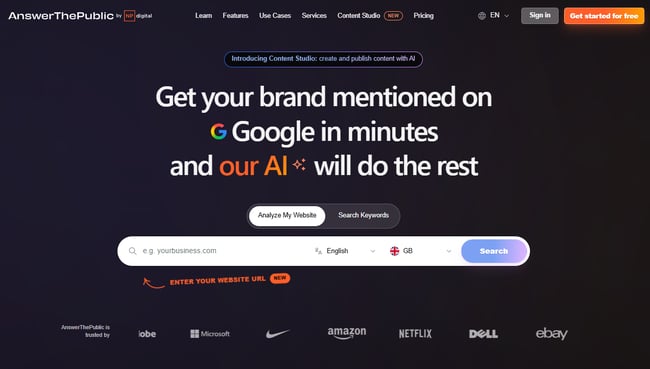
Best for: Small business marketers and content teams who want to quickly identify the questions, topics, and search phrases their audience is actually using.
AnswerThePublic is a content ideation tool built on Google autocomplete data. Enter a keyword or topic, and it generates a visual map of the questions, prepositions, comparisons, and related searches people are typing into search engines around that subject. For lean teams trying to figure out what to write about next, it removes a lot of the guesswork.
Key Features
- Visual question mapping: Generates an interactive diagram of every question, preposition, and comparison search related to a keyword, organized by search intent and phrasing, making it easy to spot content gaps and long-tail opportunities.
- AI-powered search insights: Surfaces trending search queries and emerging topics in a chosen niche, helping teams get ahead of demand rather than chasing it after the fact.
- CSV export: All keyword and question data exports cleanly into a spreadsheet, making it straightforward to build content calendars or brief writers directly from the research.
Pricing: Three free searches per day, then paid packages that start at $13.33 per month for more searches and export features.
What I like: For the price, AnswerThePublic is one of the fastest ways to fill a content calendar with topics that real people are actually searching for. The visual format is engaging and helps spot content ideas that naturally lend themselves to a topic cluster structure. It pairs well with how HubSpot’s Content Hub organizes content strategy. For a budget tool, it’s excellent. But for small businesses using HubSpot in any capacity, AnswerThePublic may repeat functionality already available.
Tools for Tracking Rankings and AI Visibility
Tracking SEO performance has always meant monitoring keyword rankings, organic traffic, and on-page engagement. In modern-day SEO, that picture is incomplete without also tracking how a brand appears in AI-generated answers. SEO and AEO are complementary disciplines, and small business strategies must optimize for both.
HubSpot AEO
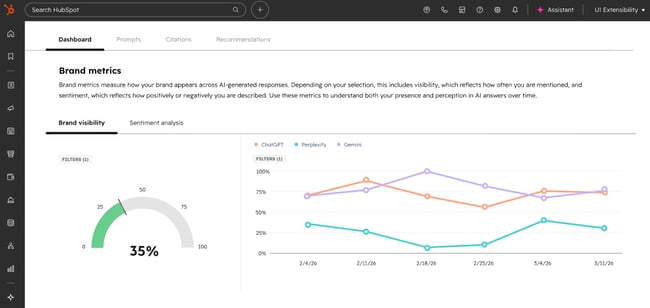
Best for: Small businesses and marketing teams who want to monitor and improve how their brand appears in AI-generated answers, then connect those insights directly to CRM data.
HubSpot AEO is designed to show marketers exactly how their business appears inside AI answer engines, and give them clear, actionable steps to improve.
What makes HubSpot AEO stand apart from other tools in this category is its CRM integration. The tool automatically suggests prompts based on industries, competitors, and customer segments because it’s connected to CRM data. Other standalone AEO tools don’t have that context. HubSpot already does.
HubSpot AEO is one of the best LLM SEO analysis software. Teams set up prompts such as the questions their buyers are likely asking AI engines, and HubSpot runs those prompts daily across ChatGPT, Perplexity, and Gemini. The platform then tracks how the brand appears in the answers: whether it’s mentioned, how it’s described, how it compares to competitors, and where the gaps are. A brand visibility scorecard tracks how well a company performs across AI-driven search experiences, signaling opportunities to improve presence.
Because HubSpot AEO sits inside Marketing Hub, recommendations connect directly to the content and social tools already in use, meaning teams can move from “we’re not showing up for this prompt” to “we’ve published content to address it.”
Key Features
- Daily prompt tracking across ChatGPT, Perplexity, and Gemini
- Competitive positioning where a brand appears relative to competitors in AI-generated answers
- Sentiment analysis that tracks not just whether a brand is mentioned, but how it’s described
- Actionable content recommendations tied directly to visibility gaps
- Integration with Marketing Hub content tools for immediate follow-through
Pricing: Free 28-day trial covers 25 prompts across all three engines, no credit card required. Then, $50/month (or $45/month billed annually), tracking 25 prompts run daily across three engines, up to 2,500 answers per month.
HubSpot AEO Grader
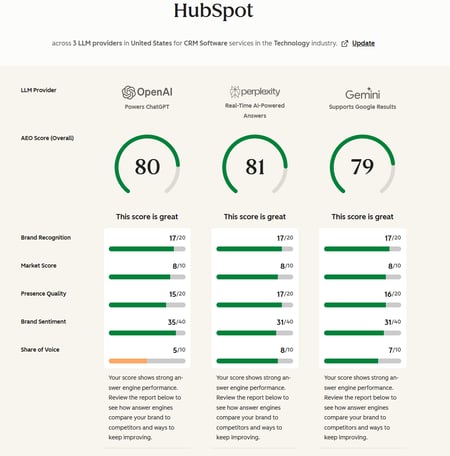
Best for: Any business that wants a fast, free snapshot of how AI engines currently perceive their brand (or competitor brands) with no setup, no subscription, and no prior AEO experience required.
HubSpot AEO Grader analyzes AI visibility across ChatGPT, Perplexity, and Gemini in a single free report. It sends brand information to all three platforms simultaneously, cross-validates their responses, and produces a composite score out of 100. Enter a company name, location, industry, and product or service description, and the grader does the rest.
The score breaks down across five dimensions:
- Sentiment Analysis
- Presence Quality
- Brand Recognition
- Share of Voice
- Market Competition
The AEO Grader is best understood as a diagnostic tool — a way to answer “how does AI represent my brand right now?” before deciding whether ongoing monitoring through HubSpot AEO is warranted. The Grader answers the question of how AI represents a brand right now; HubSpot AEO answers how that’s changing over time, and what to do about it.
What I like: HubSpot’s AEO grader is free, fast, and the output is genuinely useful. I often use it to get an initial benchmark of how a website, or its competitors, is performing. It’s a tool I use early in my auditing process, possibly in preparation for a discovery call.
I like that AEO Grader offers a structured, plain English breakdown of where a brand stands across each dimension. For small businesses that have never thought about AI visibility before, the AEO Grader is the most frictionless possible starting point. Run it, review the results, and use the gaps it surfaces to inform the next phase of content planning.
Pricing: Free forever
Google Analytics
Best for: Every business with a website.
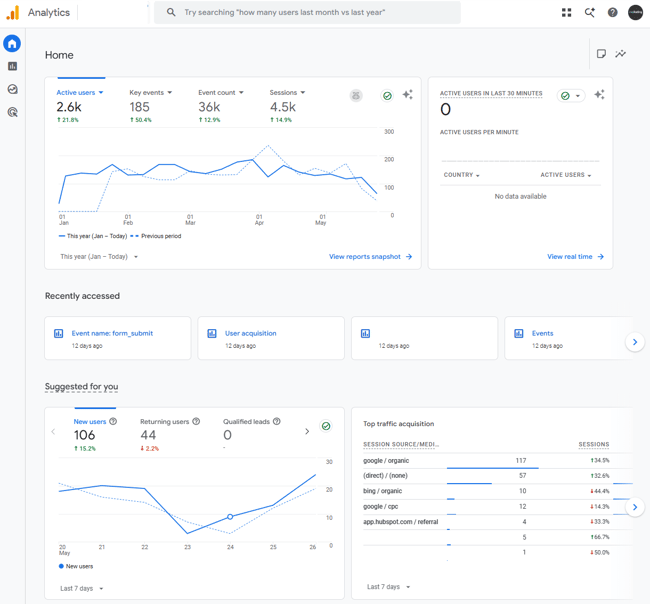
Google Analytics (GA4) is the foundation of any small business analytics setup. It’s free, built by Google, and tracks where traffic comes from, what visitors do when they arrive, and whether that activity converts into meaningful outcomes. No paid tool on this list replaces it, and the best ones integrate with it.
Key AI Features
- Generated Insights: Automatically detects and explains significant changes in GA4 data, appearing on the home page and within reports, using machine learning to analyze countless combinations of dimensions and metrics and presenting findings in plain language with suggested actions.
- Predictive metrics: Surfaces purchase probability, churn probability, and revenue predictions based on user behavior patterns, helping teams prioritize where to focus SEO and content effort.
- Anomaly detection: Flags unexpected drops or spikes in traffic, engagement, or conversions automatically, so teams catch problems before they compound.
Pricing: Free forever.
What I like: As a free Google tool, GA4 is a must. These days, my favorite use case for GA4 is segmenting audiences by AI referral source, then tracking behavior. It’s an affordable way to see the impact of AI traffic without purchasing other tools. Simply set up a report that records the conversions from AI traffic.
Google Search Console
Best for: Every business with a website. It’s a non-negotiable and should be set up on day one.
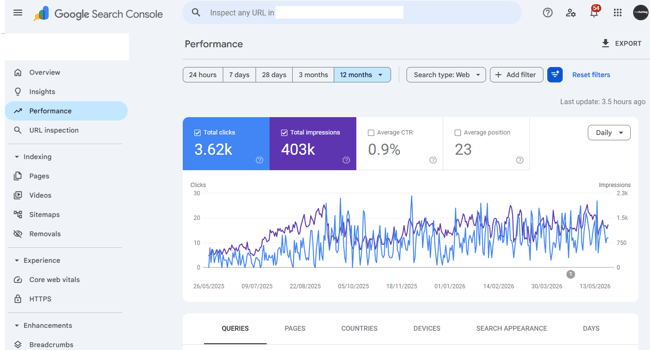
Google Search Console tracks what happens in Google before a visitor arrives. It’s the tool for your SEO, whereas GA4 is an overall marketing analytics tool.
GSC is the only tool that shows exactly which search queries are generating impressions and clicks, which pages are indexed, what technical issues Google has flagged, and how Core Web Vitals perform across the site. The data comes directly from Google, which makes it categorically more reliable than any third-party rank tracker for understanding actual search performance.
Key Features
- Performance report: Shows clicks, impressions, average position, and click-through rate by query and page, with trend data that makes it easy to spot which keywords are gaining or losing ground.
- Coverage and indexing reports: Flags pages Google can’t crawl or index, with specific error types and affected URLs, so fixes are straightforward.
- Core Web Vitals: Surfaces page experience issues affecting rankings, with mobile and desktop breakdowns and guidance on what’s causing each problem
What I like: GSC uses AI to provide insights on what’s happening in plain English, which makes it really easy for small teams without SEO expertise to see and understand their website.
Pricing: Free forever.
Featured Resource: My 18 favorite SEO tools for auditing and monitoring websites
Frequently Asked Questions About AI SEO Tools for Small Businesses
Do small businesses really need multiple AI tools for SEO?
Small businesses don’t necessarily need multiple AI tools for SEO, but most end up using at least two. No single tool covers the full SEO workflow. It’s about finding the right combination depending on internal challenges and bottlenecks. The key is avoiding too much tool sprawl and paying for overlapping features.
What’s the best way to get cited in AI answers fast?
The fastest route to AI citations is structured, specific, authoritative content that directly answers the questions buyers are asking. Clear definitions and step-by-step sections improve citation potential in AI answers, so breaking content into logical, scannable sections with descriptive headers, concise definitions, and direct answers to common questions gives AI systems more to work with.
How do I keep AI from changing my brand voice?
The most reliable protection is a clearly defined brand voice document that AI tools can reference. Usually, these come in the form of a written guide covering tone, language, terminology preferences, and phrases to avoid. Most capable AI content tools, including Breeze by HubSpot, allow teams to input brand voice parameters that shape generated output before it reaches a writer for review.
When should a small business invest in paid AI SEO tracking tools?
The right time to move from free to paid tools is when there’s a specific, identified gap that free tools can’t fill. Ultimately, a tool should really pay for itself in value or time saved. For example, HubSpot’s paid SEO and content tools make sense when the team is ready to connect content production, SEO recommendations, and revenue attribution in one place.
The right AI SEO tool is the one that solves many problems.
For small businesses that want to simplify their stack without sacrificing capability, HubSpot is the strongest all-in-one platform option available. The SEO tools inside Marketing Hub cover technical recommendations, on-page optimization, topic cluster planning, and performance tracking. Content Hub and Breeze handle content creation. Add AEO for AI visibility monitoring and the free CRM for revenue attribution, and one platform replaces what most teams are currently cobbling together across four or five separate tools.
The HubSpot SEO Starter Pack is the fastest way to get started. It’s free, practical, and built for teams scaling SEO without a dedicated specialist.

